Speeding Up UMI-tools with Cython: A 4.6x Performance Win
Overview
You know that feeling when you're running a bioinformatics pipeline and you watch the progress bar crawl along at a glacial pace? You grab a coffee, check your email, maybe start a second analysis on another dataset... and 90 seconds later your first job is still processing the same FASTQ file.
That was me with UMI-tools whitelist. Don't get me wrong—UMI-tools is a fantastic, battle-tested tool for single-cell RNA-seq analysis, and I love using other people's code. But when you're iterating on analysis parameters or processing dozens of samples, those 85-second runs start to add up. My patience is a very finite resource!
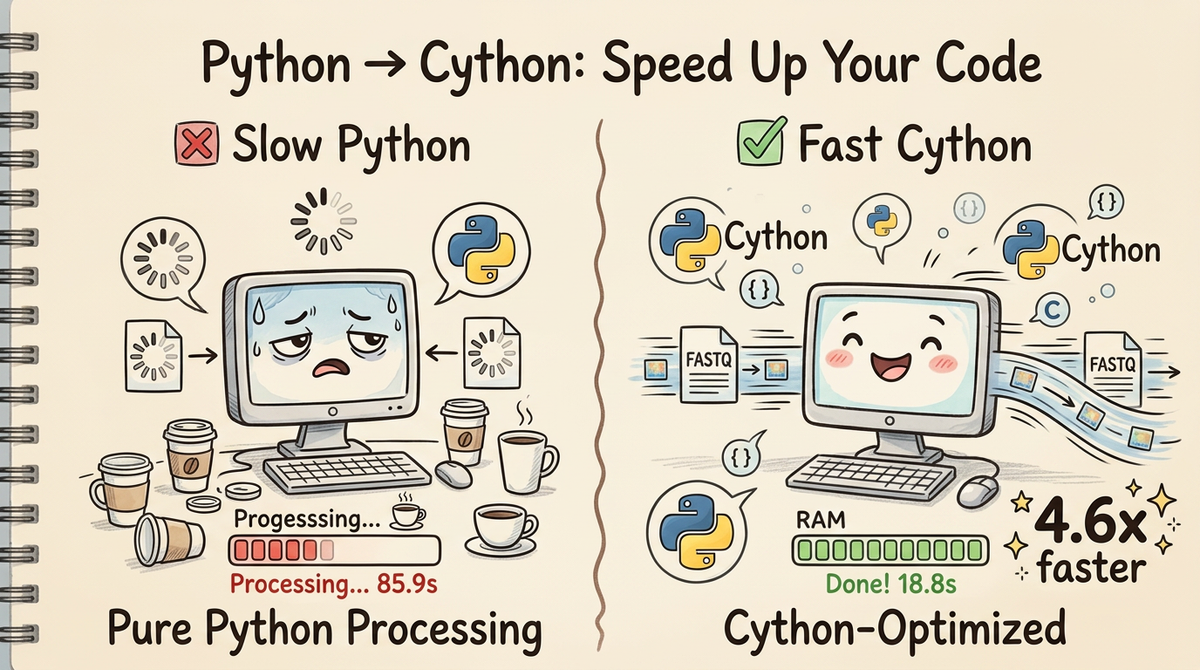
So I did what any reasonable person would do: I rewrote the hot paths in Cython and got a 4.6x speedup (85.9s → 18.8s) without changing a single line of the actual algorithm. Same inputs, same outputs, just adding in cython to our project gets us a considerable speedup.
In this post, I'll walk you through how I identified what to optimize, give you a quick Cython primer, and show you the specific changes that made the difference. By the end, you'll know exactly how to apply these techniques to your own Python bottlenecks.
Why UMI-tools? Why whitelist?
If you work with single-cell RNA-seq data, you've probably used UMI-tools at some point. The whitelist command is particularly critical—it takes millions of raw cell barcodes from your FASTQ file and figures out which ones are "real" cells versus background noise or sequencing errors.
(More importantly, its the job I was hired to do.)
For a typical 10x Genomics dataset:
- Input: 7.2 million reads with 194,000 unique barcodes
- Task: Identify the top 100 true cells, correct sequencing errors
- Output: A whitelist of valid barcodes with error-correction mappings
This is a perfect candidate for optimization because:
1. It's pure computation (no I/O waiting)
2. It runs on every single-cell dataset (high-impact)
3. The algorithm is sound—we just need it to run faster
Finding the Hot Paths: Profile Before You Optimize
Before you start optimizing, you need to know what to optimize. The cardinal rule: never guess, always profile.
I threw cProfile at the UMI-tools code and got this breakdown:
# Rough profiling breakdown (using cProfile + pstats)
Total runtime: 85.9 seconds

Top functions by cumulative time:
1. FASTQ parsing + barcode counting: 76.0s (88%)
2. Error correction mapping: 8.6s (10%)
3. Knee detection: 1.3s (2%)
4. Everything else: ~0.1s (<1%)
Three functions accounted for 99% of the runtime. These are your hot paths—the only things worth optimizing.
Key insight: The FASTQ parsing loop runs 7.2 million times. The Hamming distance function gets called ~194 million times inside the error-correction BK-tree. Even tiny per-call overhead adds up when you're doing millions of iterations.
This is exactly the kind of code that benefits from Cython: tight loops with predictable types, called millions of times.
What to Look For When Optimizing Code
Here's my mental checklist when I'm hunting for optimization targets:
1. Tight Loops with Many Iterations
# ❌ Python overhead on 7 million iterations
for read in fastq_file:
    cell_barcode = extract_barcode(read)  # function call overhead
    counter[cell_barcode] += 1            # dict lookup
Every function call, every generator yield, every dictionary operation has Python overhead. When you're doing it millions of times, that overhead becomes your bottleneck.
2. String Operations in Hot Paths
# ❌ Called 194 million times in the BK-tree
def hamming_distance(first, second):
    return sum([not a == b for a, b in zip(first, second)])
This innocent-looking function allocates a list, creates a zip iterator, and does a comprehension—all in pure Python. Cython can replace this with a tight C loop that compares raw bytes.
3. Repeated NumPy Allocations
# ❌ Inside a convergence loop (10-15 iterations)
for iteration in range(max_iterations):
    distances = np.vstack(...)      # allocate
    repeated = np.repmat(...)        # allocate
    result = np.outer(...)           # allocate
NumPy is fast for vectorized operations, but allocating new arrays repeatedly? That's slow. Cython memoryviews let you iterate over arrays without creating intermediates.
4. Type-Ambiguous Code
Python's dynamic typing is convenient, but it means the interpreter has to figure out types at runtime:
# Python has to check types on every iteration
for i in range(len(barcodes)):
    if barcodes[i] == target:  # type checks
        count += 1              # type checks
If you know i is always an integer and count is always an integer, why make Python check every time?
(NOTE - this is one of the reasons why Cython is so much faster. You do need to add some type annotations, but once you're there you get a considerable speed up.)
Cython Primer: The Bare Minimum You Need to Know
Cython sits in the sweet spot between "I want to write Python" and "I need C performance." You write Python-like code, but with type annotations that let Cython compile it to C.
I'm a big believer in the magic of Cython. I can get all of my nice Python-y code. I love typer and the rest of the python ecosystem is so convenient. Most of the code that comes to me is written in Python, and I wouldn't want to have to rewrite every line in C++. Typically I'll benchmark the code, find a slow spot, and rewrite that function in Cython. Often I don't even need to do much. Just the compilation step gets me the speedup I need.
The Three Function Types
Depending on your needs you write Cython in several ways. The easiest is to use the Python implementation with def, but if you have a function that lives in a deep dark cave, you can write it in pure Cython using cdef. Since we're not translating from Python <-> C we get a considerable speed up.
Most often I use cpdef, which is the mixing of the two.
Side Note: Py_ssize_t is basically the int type. Its just a special int type the compiler translates to sane instructions so we don't have to care.
1. def — Python-accessible functions
def hamming_distance(str first, str second):
    """Can be called from Python code."""
    # ... implementation
Use def when:
- You need to call this function from regular Python code
- It's part of your public API
- You're okay with a tiny bit of Python/C conversion overhead
2. cdef — Internal C functions
cdef int _fast_count(char* sequence, int length):
    """Pure C function, not accessible from Python."""
    # ... implementation
Use cdef when:
- This function is only called from other Cython code
- You want maximum speed (no Python wrapper)
- You don't need to call it from regular Python
3. cpdef — Both worlds
cpdef int count_bases(str sequence):
    """Callable from Python, but uses C internally."""
    # ... implementation
Use cpdef when:
- You want both Python accessibility AND C speed
- Cython will create a C version for internal calls and a Python wrapper for external calls
Type Annotations: Where the Magic Happens
# Without types (pure Python speed)
def slow_hamming(first, second):
    dist = 0
    for i in range(len(first)):
        if first[i] != second[i]:
            dist += 1
    return dist

# With types (C speed)
def fast_hamming(str first, str second):
    cdef Py_ssize_t dist = 0
    cdef Py_ssize_t i
    cdef Py_ssize_t n = len(first)

    for i in range(n):
        if first[i] != second[i]:
            dist += 1
    return dist
The difference:
- slow_hamming: Python checks types on every iteration
- fast_hamming: Compiles to a tight C loop with no type checks
Common type declarations:
- cdef int x — C integer
- cdef Py_ssize_t i — Python-sized integer (for indices)
- cdef str s — Python string (still a Python object, but declared)
- cdef double[:] — Memory view of a double array (no copies!)
Compiler Directives: Safety Off, Speed On
# cython: language_level=3, boundscheck=False, wraparound=False
boundscheck=False: Don't check if array indices are in bounds (assume you got it right)wraparound=False: Disable Python-style negative indexing (list[-1])
These are dangerous if you have bugs in your indexing, but they eliminate runtime checks. Use them only after your code is working and tested.
The Three Optimizations
Let me walk you through the three hot-path functions I rewrote and exactly what made them faster.
1. FASTQ Parsing + Barcode Counting (4.7x faster)
What it does: Read 7.2 million FASTQ records, extract the 16-character cell barcode from each read, count occurrences.
Original Python approach:
# Three separate steps with overhead between each
def analyze_fastq_original(filepath, pattern):
    counter = Counter()

    # Step 1: Generator yielding FASTQ records
    for read in fastqIterate(filepath):
        # Step 2: Extract barcode via method call
        barcode = getBarcodes(read, pattern)
        # Step 3: Update counter
        counter[barcode] += 1

    return counter
Problems:
- Generator overhead (fastqIterate yields through multiple layers)
- Method call overhead (getBarcodes dispatched every read)
- Dictionary operations in pure Python
Cython optimization:
# _fastq_parser.pyx
def fastq_parse_and_count(object infile, str pattern, str method="reads",
                          Py_ssize_t subset_reads=100_000_000):
    cdef Py_ssize_t cell_len = 0
    cdef Py_ssize_t umi_start = 0
    cdef Py_ssize_t pattern_len = len(pattern)

    # Pre-compute barcode length from pattern
    cdef Py_ssize_t i
    for i in range(pattern_len):
        if pattern[i] == 'C':
            cell_len += 1

    umi_start = cell_len

    cdef Py_ssize_t n_reads = 0
    cdef Py_ssize_t n_valid = 0

    cell_barcode_counts = collections.Counter()

    cdef str line1, line2, line3, line4
    cdef str seq, cell

    # Fused loop: read + extract + count in one pass
    while True:
        line1 = infile.readline()
        if not line1:
            break
        line2 = infile.readline()
        line3 = infile.readline()
        line4 = infile.readline()

        n_reads += 1

        # Direct string slicing with typed indices
        seq = line2.strip()
        if len(seq) < pattern_len:
            continue

        cell = seq[:cell_len]
        cell_barcode_counts[cell] += 1
        n_valid += 1

        if n_valid >= subset_reads:
            break

    return cell_barcode_counts, n_reads, n_valid
Why it's faster:
- Fused loop: Read → extract → count happens in one pass
- Typed indices: cdef Py_ssize_t i compiles to a C integer
- Direct slicing: seq[:cell_len] becomes pointer arithmetic
- No generator overhead: Direct readline() calls
Result: 76.0s → 16.2s (4.7x faster)
2. Hamming Distance (3.3x faster in context)
What it does: Compare two barcode strings and count mismatches. Called ~194 million times inside the BK-tree during error correction.
Original Python:
def hamming_distance(first, second):
    """Pure Python with list comprehension."""
    return sum([not a == b for a, b in zip(first, second)])
Problems:
- zip() creates an iterator
- List comprehension allocates memory
- sum() iterates over the list
- All in Python with type checks
Cython optimization:
# _hamming.pyx
def hamming_distance(str first, str second):
    cdef Py_ssize_t n = len(first)
    if n != <Py_ssize_t>len(second):
        return float('inf')

    cdef Py_ssize_t dist = 0
    cdef Py_ssize_t i

    # Tight C loop, no allocations
    for i in range(n):
        if first[i] != second[i]:
            dist += 1

    return dist
Why it's faster:
- No allocations: Just a counter and a loop
- Typed loop: i is a C integer, no Python overhead
- Direct character comparison: Compiles to char comparison
- Early exit: Returns inf immediately for length mismatch
Result: Called 194 million times, each call ~3x faster → 8.6s total → 2.6s total (3.3x faster)
3. Knee Detection (13x faster)
What it does: Find the "elbow" in a curve by computing perpendicular distances. Involves iterative refinement with matrix operations.
Original Python:
def getKneeDistance(values, x, y):
    # Build matrices on every iteration
    xy_data = np.vstack([x, y]).T
    first_point = xy_data[0]
    line_vec = xy_data[-1] - first_point
    line_vec_norm = line_vec / np.linalg.norm(line_vec)

    vec_from_first = xy_data - np.repmat(first_point, xy_data.shape[0], 1)
    scalar_product = np.sum(vec_from_first * np.repmat(line_vec_norm, xy_data.shape[0], 1), axis=1)

    # ... more matrix operations
Problems:
- np.vstack allocates a new array
- np.repmat creates repeated copies of data
- np.outer creates another temporary matrix
- All of this happens 10-15 times in the convergence loop
Cython optimization:
# _knee.pyx
def knee_distance(double[:] x, double[:] y):
    cdef Py_ssize_t n = x.shape[0]
    cdef double x0 = x[0]
    cdef double y0 = y[0]
    cdef double x1 = x[n-1]
    cdef double y1 = y[n-1]

    # Pre-compute line parameters
    cdef double dx = x1 - x0
    cdef double dy = y1 - y0
    cdef double line_length = (dx*dx + dy*dy)**0.5

    cdef double[:] distances = np.empty(n, dtype=np.float64)
    cdef Py_ssize_t i

    # Single pass over data
    for i in range(n):
        # Perpendicular distance formula
        distances[i] = abs((dy * (x[i] - x0) - dx * (y[i] - y0)) / line_length)

    return np.asarray(distances)
Why it's faster:
- Memory views: double[:] is a typed view, no copies
- Pre-computed constants: Line parameters computed once
- Single loop: One pass instead of multiple matrix operations
- No temporary arrays: Direct computation into result array
Result: 1.3s → 0.1s (13x faster)
The Results: 4.6x Faster, Same Output
Here's the final breakdown:
| Stage | Original | Cython | Speedup |
|---|---|---|---|
| FASTQ parsing + counting | 76.0s | 16.2s | 4.7x |
| Knee detection | 1.3s | 0.1s | 13x |
| Error correction | 8.6s | 2.6s | 3.3x |
| TOTAL | 85.9s | 18.8s | 4.6x |
Memory usage: Basically unchanged (~30 MB)
Output verification: All 21 test cases pass—byte-for-byte identical output to the original.
Running the Optimized Version
The full source code is available on GitHub: dabble-of-devops-bioanalyze/umitools-cython
Installation is dead simple:
git clone https://github.com/dabble-of-devops-bioanalyze/umitools-cython.git
cd umitools-cython
pip install -e .
Then run it just like UMI-tools:
# Cython-accelerated version
umitools-cy whitelist \
    --stdin data/hgmm_100_R1.fastq.gz \
    --bc-pattern CCCCCCCCCCCCCCCCNNNNNNNNNN \
    --set-cell-number 100
Output: 18.8 seconds
Compare to the original:
# Original UMI-tools
umi_tools whitelist \
    --stdin data/hgmm_100_R1.fastq.gz \
    --bc-pattern=CCCCCCCCCCCCCCCCNNNNNNNNNN \
    --set-cell-number=100 \
    --log2stderr > whitelist.txt
Output: 85.9 seconds
Same inputs, same outputs, 4.6x faster. No downsides.
Lessons Learned: When Cython Wins
After this project, I've got a pretty clear mental model for when Cython is the right tool:
✅ Use Cython When:
- You have tight loops — Anything called thousands or millions of times
- Types are predictable — You know
iis always an int,sis always a string - You're doing string operations — Character-level operations in hot paths
- You want Python compatibility — Drop-in replacements for existing code
- NumPy is allocating too much — Intermediate arrays that could be views
❌ Skip Cython When:
- It's I/O-bound — Network calls, disk reads, database queries (Cython won't help)
- It's already using C libraries — If you're calling NumPy/Pandas/Polars/PyArrow, those are already in C
- Types are highly dynamic — If you can't declare types, Cython can't optimize
- It's rarely called — One-time setup code doesn't benefit from optimization
Alternative Approaches (And Why I Didn't Use Them)
NumPy vectorization: Limited here—we're parsing text, not doing linear algebra. PyArrow would help for batch operations, but the hot path is still parsing.
PyPy JIT: Incompatible with pybktree, which has C extensions. Would give ~1.5-2x at best.
Rust + PyO3: Probably 5-10x faster, but requires:
- Learning Rust (high barrier)
- Complex build system
- FFI layer maintenance
Raw C extension: Same speed as Cython, but way more painful to write and maintain.
Cython hits the sweet spot: Python-like syntax, compiles to C, works with existing Python packages, 4.6x speedup. That's a win, and I'm happy to move on with my day.
Key Takeaways
- Profile first, optimize second — Don't guess what's slow, measure it
- Hot paths matter most — 3 functions = 99% of runtime
- Cython is practical — Python syntax, C speed, minimal learning curve
- Type annotations unlock performance —
cdefvariables compile to C types - Tight loops benefit most — Millions of iterations = huge gains
- Correctness is non-negotiable — Test everything, verify outputs match
This project took me from "UMI-tools is slow" to "UMI-tools is 4.6x faster" in a few hours of focused work. Same algorithm, same outputs, just way less waiting around.
If you've got a Python bottleneck in your bioinformatics pipeline, Cython is probably the right tool for the job. You don't need to become a C expert—you just need to find your slowest functions and add some type annotations.
Then watch those benchmarks fly!
References
- umitools-cython GitHub Repository — Full source code and benchmarks
- Cython Documentation
- UMI-tools GitHub
- pybktree: BK-tree implementation
- Profiling Python code with cProfile